How to Correctly Calibrate pH and Oxygen Sensors
Proper calibration and maintenance of pH and oxygen sensors are essential for accurate measurements, reliable performance, and maximum sensor lifetime.

Calibration ensures that pH and oxygen sensors deliver accurate and reliable measurements under real process conditions. This guide explains recommended calibration procedures for pH, optical oxygen, and electrochemical oxygen sensors, along with maintenance practices that help maintain sensor performance and extend service life.
pH Sensors:
For accurate pH measurement, a 2-point calibration is recommended using two buffer solutions that bracket the expected process range and differ by at least 2 pH units.
- Hydrate the sensor before calibration (especially after dry storage). A pH electrode should be hydrated for at least 24 hours if it has dried out.
- Select two fresh pH buffer solutions (e.g., pH 4.01 and pH 7.00, or pH 7.00 and pH 10.01). Never reuse contaminated or expired buffers.
- Rinse the sensor with deionized water before placing it into the first buffer.
- Allow the reading to stabilize (typically 1–3 minutes).
- Complete the first calibration point.
- Rinse the sensor again with deionized water and gently dab dry. Do not rub the glass membrane, as static charges can affect calibration accuracy.
- Repeat the procedure with the second buffer.
- Ensure that the buffer temperature is known and ideally matches the process temperature to minimize temperature-related calibration errors.
- Discard the used buffer after calibration. Never return used buffer to the original bottle.
Calibration compensates for both zero-point drift and slope changes of the pH electrode. A pH measurement can never be more accurate than the buffer solutions used for calibration. Regular recalibration is required because electrodes age over time. The optimal interval depends on temperature, process conditions, and required accuracy.
Oxygen (pO₂) Sensors
For an optical oxygen sensor, a two-point calibration in air and nitrogen is required only in the following cases:
- After each ODO cap replacement.
- For applications requiring high accuracy.
Calibration in air (calibration point air)
To calibrate the VisiFerm™ mA Sensor in air, follow these steps:
1. Make sure the temperature, humidity, and pressure values are constant.
2. Launch the calibration application, e.g., ArcAir.
3. Power the optical sensor and connect to ArcAir via the Arc Wireless Converter BT.
4. Select the applicable sensor in the sensor list.
5. Open the Calibration tab.
6. Select Calibration Point Air.
7. Click Start to initiate the calibration wizard.
8. Hold the sensor for 3 min in air and press the calibration button.
Zero-point calibration (zero oxygen point)
To do a zero-point calibration for the optical sensor, follow these steps:
- Install the optical sensor into an oxygen-free calibration container and connect the nitrogen calibration gas.
- Power the optical sensor and connect to ArcAir via the Arc Wireless Converter BT.
- In the ArcAir application, select the applicable sensor in the sensor list.
- Open the Calibration tab.
- Select Zero-Point Calibration.
- Immerse the sensor into an oxygen-free environment (e.g., using nitrogen). Make sure the gas flow rate does not exceed 0.5 L/min and avoid overpressure.
- Click Start to initiate the calibration wizard.
- Follow the on-screen instructions in ArcAir to complete the zero-point calibration procedure.
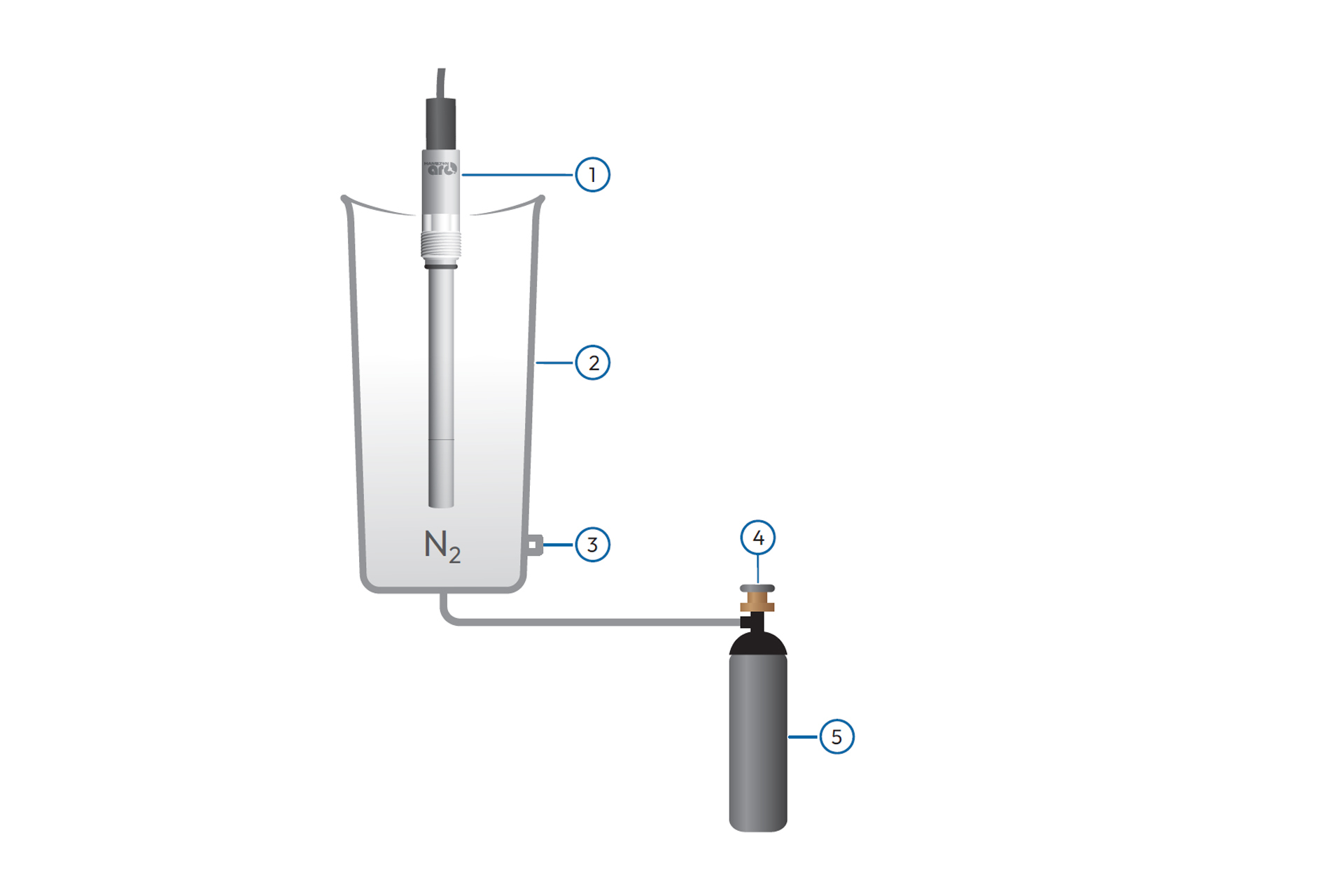
1. VisiFerm™ mA Sensor
2. Calibration station
3. Venting tube
4. Flow control valve
5. Nitrogen gas source
Electrochemical Sensor Maintenance Procedure
Before calibration, perform the maintenance procedure to ensure optimal measurement and calibration performance.
Replacing the electrolyte and the membrane cartridge
The electrochemical sensor membrane cartridge is replaced as follows:
- Put the sensor in an upright position and carefully unscrew the membrane cartridge (E), empty and rinse with water.
Attention: Do not clean or touch the cathode or anode in any way, including touching or cleaning with any kind of cloth. Do not subject the glass body to any physical stress. The electrolyte is aggressive. - Check the small O-ring (D) above the cathode. Replace it if it is damaged.
- Use the plastic pipette of the membrane kit to dispense 1.5 ml of electrolyte (e.g. Oxylyte B) into the new membrane cartridge.
- Carefully screw the cartridge onto the sensor shaft. Any spillage of electrolyte should be rinsed away with water.
- Unscrew and empty the membrane cartridge. Repeat steps 3 and 4.
For cathode replacement instructions, see our detailed guide: Cathode Replacement on Polarographic DO Sensors. Replacing the cathode and membrane as recommended helps maintain measurement accuracy and ensures optimal sensor performance.